ALMNJOY PACKET LABS

NETWORKING · NOTES · PRACTICE

A notebook for working through network problems, one capture at a time. Pick a short exercise, inspect the evidence, and make the call. The original captures and deeper field notes are here when you want to go further.

THE APPROACH

Start with what the packets show.
Then work out what you still need to know.

CHOOSE A SCENARIO0 / 6 solved this sessionSynthetic teaching examples

Choose a packet lab

Where to capture Diagram & field notes
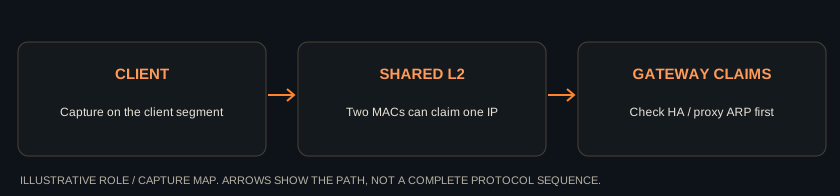
ARP capture path

DISPLAY FILTER
Select a packet number to read the evidence. Filters apply to this teaching example only.
No.TimeSourceDestinationProtocolInfo
MAKE THE CALL

Field notes: what to check next

Protocol reference ↗
FROM THE ORIGINAL LAB COLLECTION

The original files. Checked against the packets.

Three recovered captures, checked against their contents.

The exercises above use synthetic teaching traces. These files are Dustin's original published captures, recovered from the LAB-Files repository. Their contents were checked with TShark on September 14, 2026. The filenames do not always describe what the packets prove.

6 FRAMES / ARP BASELINE

The duplicate that isn't shown.

Duplicate-ARP.pcap contains three requests and three replies. All replies advertise the same gateway IP with the same sender MAC. This file alone does not demonstrate a duplicate address.

Try it: filter on arp. Compare the sender IP and MAC across all six frames. Explain what extra evidence would establish a conflict.

Open original capture on GitHub ↗
36 RADIUS PACKETS / 2 ACCEPTS

A successful exchange.

RADIUS-Accept-EAPTLS.pcap contains two successful exchanges: 18 Access-Requests, 16 Access-Challenges and 2 Access-Accepts. There are no Access-Reject packets.

Try it: filter on radius. Follow the first exchange through original frames 968 to 1028. Pair response identifiers with their requests. What does the challenge mean?

Open original capture on GitHub ↗
9 RADIUS PACKETS / REQUESTS ONLY

Requests without observed replies.

Repeat-Radisu.pcap contains nine Access-Requests and no RADIUS replies. Identifiers 69, 70 and 71 each appear three times.

Try it: compare request timing, identifiers and packet contents. State what a second capture point or server log would add. Missing replies here do not prove a wrong shared secret.

Open original capture on GitHub ↗

The two RADIUS files also contain unrelated network traffic. This page links to the existing repository rather than republishing the complete captures as new downloads. Review and minimize them before a new public release. The synthetic lesson downloads remain plain text, not PCAP files.

Recovered original: RADIUS acceptance

This is the screenshot from the original repository, showing a successful EAP-TLS exchange ending in Access-Accept. Its displayed numbering is not the original full-capture frame numbering above. It is not evidence for the rejection exercise.
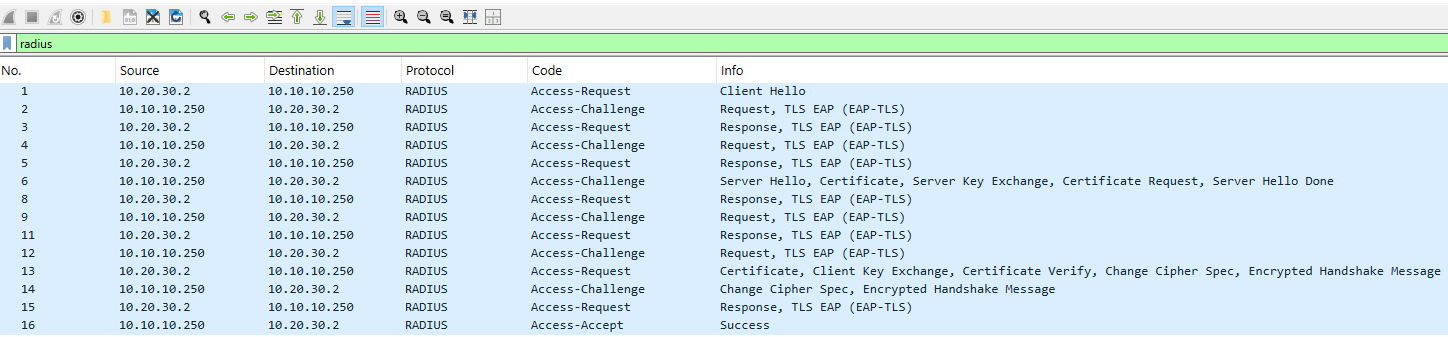
Recovered original Wireshark screenshot showing RADIUS requests and challenges followed by Access-Accept; open at full size

Original repository and attribution ↗ · Original MIT license
RECOVERED TUTORIALS

Set up Wireshark for the question.

The original tutorials for profiles, columns and filters.

These are the original profile, column and filter animations. Open a tutorial to load it. Their interface reflects the version used when they were recorded; menu placement may differ today.

QUICK REFERENCE / DISPLAY FILTERS

Useful filters, with their limits.

Ten useful display filters and the limits of each.
QuestionDisplay filterRead it correctly
Traffic involving an IPv4 addressip.addr == 192.0.2.10Source or destination IPv4 address. IPv6 uses different fields.
Who is advertising this IPv4 address?arp.src.proto_ipv4 == 192.0.2.1Compare sender MACs and operational context. A change is not automatically an unintended conflict.
Initial TCP connection requeststcp.flags.syn == 1 && tcp.flags.ack == 0Excludes SYN-ACK replies. Does not establish why a reply is absent.
Traffic on TCP port 443tcp.port == 443Selects a port. Does not prove HTTPS or show decrypted application data.
IPv4 packet too large for the next hopicmp.type == 3 && icmp.code == 4Fragmentation Needed for IPv4. Check the quoted packet and reported MTU.
IPv4 fragmentsip.flags.mf == 1 || ip.frag_offset > 0Includes the final fragment, which may have MF cleared.
DNS name errorsdns.flags.response == 1 && dns.flags.rcode == 3NXDOMAIN responses. NOERROR with an empty answer is a different case.
RADIUS acceptance or rejectionradius.code == 2 || radius.code == 3Code 2 accepts; code 3 rejects. Code 11 is a challenge, not a failure.
TCP analysis notestcp.analysis.flagsIncludes multiple analyzer observations. Capture loss, reordering and offload can affect interpretation.
A gap between TCP packetstcp.time_delta > 0.2A time gap, not a direct RTT or latency measurement. Inspect request/response context.

References: TCP, ARP, ICMP, DNS, RADIUS.

RESTORED DEPTH / EIGHT ORIGINAL TOPICS

EAP-TLS: find the side that says no.

Eight topics for working through certificate authentication.

These are corrected field notes for the original eight detail topics. They are not eight recovered packet captures. The old detail pages had screenshot placeholders. Use the rejecting endpoint's logs and policy alongside the capture.

Client does not present a certificate

Check that an eligible client certificate and its private key are accessible to the supplicant. Confirm the authentication profile and certificate selection rules. On the server, check whether a certificate was requested and received.

An empty certificate message may help when visible, but handshake details depend on TLS version and decryption context. A failed attempt alone does not prove the certificate is missing.

Client certificate is outside its validity period

Check both NotBefore and NotAfter. For validation of the client certificate, the authenticating server's clock matters. Also check endpoint clock synchronization because each side can perform its own validation.

Confirm the server's reason, renew or re-enroll through the intended CA process, and test certificate selection after renewal. “Not yet valid” and “expired” are different conditions.

Server does not trust the client certificate

Check the server's intended trust anchors and the intermediate chain. A valid signature does not by itself establish trust. Confirm the certificate maps to an identity the server policy allows.

Supply the required intermediates and trust configuration through the managed certificate process. Do not solve this by disabling validation or trusting an arbitrary presented certificate.

Client does not trust the server certificate

Check the configured server identity, intended CA trust and chain on the supplicant. A certificate from a public CA is not automatically acceptable for your EAP deployment.

Use the expected CA and server-name restrictions in the managed profile. Confirm which side emitted the alert and inspect its log. Do not accept an unexpected server identity just to make login work.

Certificate purpose does not match policy

Inspect Key Usage, Extended Key Usage and the EAP implementation's requirements. Client Authentication uses OID 1.3.6.1.5.5.7.3.2; Server Authentication uses 1.3.6.1.5.5.7.3.1.

Reissue using the correct template when the certificate and policy do not match. Missing EKU is not universally identical to the wrong EKU across all validators. Keep validation enabled and consult the actual server or supplicant rules.

Revoked certificate or failed revocation check

A confirmed revoked status differs from an unavailable responder, stale CRL or failed network lookup. Inspect the validator's log and configured behavior.

For an actually revoked certificate, investigate the reason and replace it through the CA process. For a lookup failure, check access, freshness and policy. Do not collapse both conditions into “certificate revoked.”

TLS version or cipher negotiation fails

Compare offered and supported versions, cipher suites and signature algorithms. If there is no acceptable combination, negotiation can fail before a successful ServerHello selection.

Review both endpoint policies and supported software versions. Update the incompatible component or policy deliberately; avoid enabling obsolete cryptography as a default workaround.

Large authentication exchanges stall

Capture both ends of the tunnel. Compare direction, usable MTU, DF behavior, ICMP errors and fragments. Separate EAP-TLS fragmentation from IP fragmentation.

TCP MSS does not resize UDP RADIUS traffic. A server's large certificate exchange can fail even when a smaller request arrives. Confirm the actual transport and apply its supported fragmentation or sizing controls.

Protocol references: EAP-TLS / RFC 5216, EAP-TLS with TLS 1.3 / RFC 9190, Certificate validation / RFC 5280, RADIUS / RFC 2865.

Field notes by Dustin Alleman. Adapted from NetAdminToolbox.
These examples are synthetic teaching data, not real customer captures or a browser version of Wireshark. Independent educational resource.